Buy any 1 product and get 1 absolutely free — this offer applies to all Website Templates, UI Kits, and Complete Scripts.
Buy Now! Article Information
If you’ve ever tried to build a business website for clients from scratch, you already know the flow: you open a blank project, stare at the empty folder, and suddenly ask yourself, “Why am I doing everything again when there are templates that already look ten times better than what I’m about to code?”
That’s the moment most developers start searching for premium HTML templates for business websites. It’s a fact that templates save time, reduce frustration, and still let you deliver something polished enough that clients think you spent weeks on it.
But here’s the problem: the web is flooded with HTML templates. Some look great in demos but fall apart once you download them. Others are so poorly structured that even minor customization turns into a wrestling match with CSS files.
So the real question isn’t “Where can I buy templates?”
But, “Where can I buy good, reliable templates that won’t ruin my workflow?”
This guide will help you get the answer to this question, along with important details that are advisable to know.
Do you think that finding a template is about picking the prettiest layout? No, it’s not.
A business website has specific needs. Especially if you’re building for clients who expect a certain level of polish and impressive branding.
Here’s what you should look for before clicking that “Buy” button for a template.
As we talked before, every business niche has its own flavor. A SaaS landing page doesn’t look anything like a digital agency homepage. And a consulting firm? They want a calm, credible, and structured layout.
Here’s the simplest way to think about it:
Software As A Service business website templates are designed accordingly:

Clean feature blocks: SaaS users want clarity, not clutter. The template should present features in simple, well-organized blocks. From there, users can instantly understand what the product actually is.
Pricing tables: In the SaaS industry, transparent pricing is a huge trust factor for user experience. The template is a structured, easy-to-compare pricing table that helps users make a quick decision.
Sections explaining the product: Visitors expect a clear understanding of how the product works. So, these sections should walk people through the benefits, workflows, and core functionalities without creating confusion.
Smooth animations (but not heavy ones): SaaS sites look more polished with minimal motion. But heavy effects and animations slow things down. It means the visual elements should feel proper, modern, and distraction-free.
When selecting a digital agency website template, the requirements are opposite to SaaS ones. Here’s what you have to know:
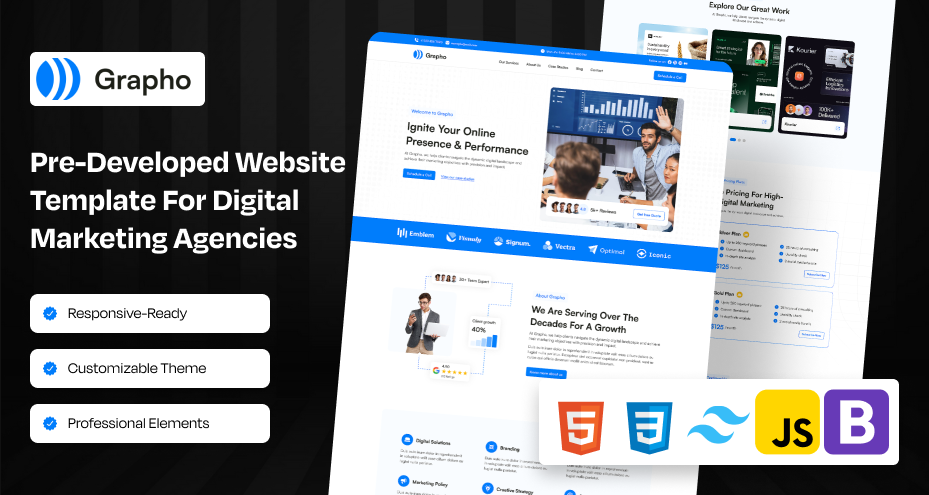
Portfolios: Agencies rely on proof of work. A good template should include portfolio sections to highlight past projects in a clean and client-friendly way.
Service pages: Each service needs its own page or section to explain. It helps potential clients understand what’s offered, how it works, and why the agency is a good fit.
Testimonial sliders: To help businesses convince their clients. Testimonials sliders give agencies an easy way to showcase client feedback without confusing the page or breaking the flow.
Clear CTA sections: Agencies depend on leads, so strong, visible calls-to-action help guide visitors toward contact forms, discovery calls, or project inquiries.
A consultancy service firm's website templates are designed with the most important things:

Professional, trust-driven layouts: Consultants often serve detail-oriented clients, so templates should feel calm, reliable, and refined. The primary goal is to make visitors feel confident in the consultant’s expertise.
Case studies: Real results matter in consulting. Templates should include well-designed case study pages that highlight challenges, solutions, and outcomes with clarity.
Content-focused pages: Consultants rely heavily on thought leadership. The template page should provide clean, readable blog and resource landing pages designed for long-form content.
If the template designer clearly understands the industry, you’ll feel it the moment you scroll through the demo.
Almost every template says “100% Responsive,” but we both know some of them fold like paper on tablets.
Before buying one of them, always check the following aspects:
Note that you don’t just resize your browser. Open the preview of the template on your real phone. It tells you more than you think. Mobile-friendly website templates are always preferable.
For developers, code quality decides how the website is developed after being made through a template. Clean, structured, modular code is the foundation of long-term flexibility.
Look for the following elements:
In short, clean code also ensures that future developers, whether teammates or clients everyone can maintain the project effectively.
Google rewards websites that load fast, render efficiently, and deliver stable experiences. A premium template must be designed with search engine optimization foundations in mind.
Here’s what and why it matters:
Semantic HTML: This is just clean, meaningful code. It helps Google understand what’s a heading, what’s a paragraph, what’s navigation, and so on.
Heading hierarchy: Your page shouldn’t look like: H1 → H4 → H2 → H6, as it confuses search engines and makes your content harder to scan. Good SEO-optimized templates keep headings organized, which helps readability.
Structured content: Templates with well-organized content areas: hero, features, CTA, footer, make it easier for visitors to follow your story (and for Google to crawl it).
Fast load speeds: People leave slow sites in seconds. Even small delays feel frustrating. And yes, Google doesn’t rank slow pages because they ruin user experience.
What to Check Before Buying:
Lighthouse score: Think of this as a quick usability check. If the demo site scores abnormally, the template probably needs a lot of cleanup work.
CSS and JS bundle size: Huge files = longer load time. If the template ships with 500 KB of scripts for simple interactions, that’s extra work for you later.
Optimized images: You shouldn’t have to compress every single image the moment you download the template. Good ones already do this.
Animations that slow things down: A little motion is fine. But when every scroll triggers a firework show, both users and browsers get overwhelmed.
In essence, website speed optimization is required as business websites need to provide a fast experience with professionalism.
This is one of those things you don’t think about until you’re stuck at 2 AM, wondering, “Why does this slider refuse to behave?” A professional website template means nothing if you have no idea how it works under the hood.
Good documentation is like having the developer sitting next to you, saying, “Relax, here’s how it’s built.”
Need good support? That’s the key element when things get confusing.
Here’s what you should always look for in:
Step-by-step setup instructions: This helps you get everything running without guessing which file goes where.
Clear explanation of components: You should know what each section does and how to modify it.
FAQs: Saves you from repeating common mistakes or hunting for answers across forums.
A legit support channel: Email, chat, tickets, anything that proves the developer is actually available.
When a developer provides solid documentation and real support, it’s a sign they genuinely care about the user experience and that their template is worth your time.
Good design isn’t enough. Modern business websites need structure, scalability, and conversion-focused elements. Below are essential features every premium template should include.
A business website isn’t just there to look pretty. It needs to do something. Whether that’s generating leads, booking calls, getting sign-ups, or nudging someone to ask for a quote, your template should naturally guide visitors toward taking action.
A clear CTA in the hero section: It is the first place where users decide if they want to engage or not.
A sticky header CTA: This can be a perfect choice for keeping key actions always visible.
Service-specific CTAs: This CTA helps users take action right on the page that answers their need.
A footer inquiry section: A Footer inquiry section can be great enough to catch those who scroll to the bottom looking for contact info.
Strong CTAs on pricing pages: This CTA is essential for SaaS, agencies, or product-focused businesses.
Blog CTAs: It is proper for turning readers into leads without disrupting the reading experience.
What matters most is the placement of these elements. High-quality templates don’t just throw buttons everywhere. They understand user flow and place CTAs where people naturally make decisions.
A truly business-ready template should feel like half the work is already done for you, even front-end website development. The more essential pages it includes, the faster you can move from setup to launch without wrestling with layout after layout.
Look for templates that come with the core pages every professional website needs, such as:
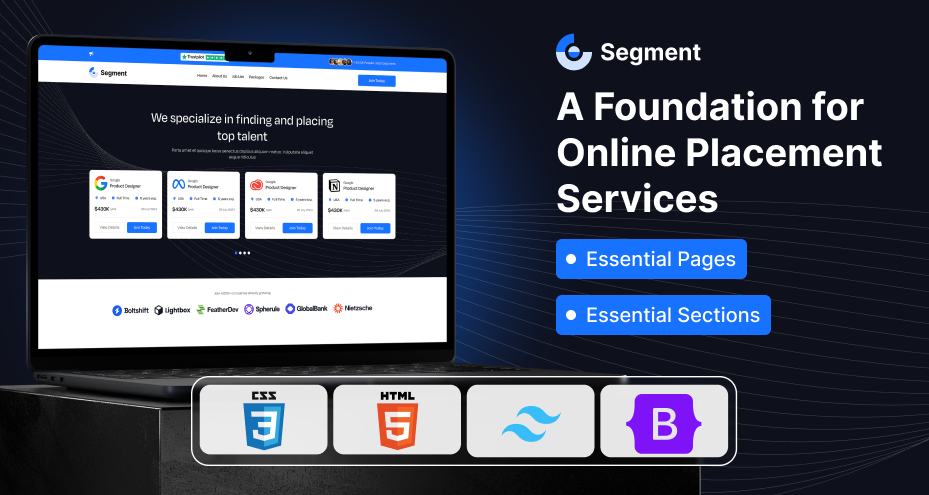
A well-structured About page: It should help you tell the brand’s story clearly, without needing to redesign the entire page.
A modular Services page: This makes it easy to add, remove, or rearrange service blocks without breaking the layout.
A polished Contact page with validated forms: It saves you the trouble of wiring forms from scratch and ensures users can reach you smoothly.
Blog and article pages: These pages are perfect for SEO, content marketing, and keeping the website active.
FAQ pages: Having these FAQ pages helps to answer common questions and reduce support load.
Portfolio or case study layouts: These professionally designed landing pages with UI and UX are ideal for agencies, consultants, or service providers who need to showcase work.
Optional careers page: These page layouts are helpful if the business is hiring or wants to attract talent.
Templates with these ready-made pages save hours of development time and guarantee visual consistency across the site. It’s one of those features that pays for itself the moment you start building.
A template built on outdated tech quickly becomes a headache, but one built on current frameworks like Bootstrap 5 and Tailwind CSS feels smooth, stable, and future-ready.
Here’s what you get with each:
Bootstrap is still a favorite for a reason as it’s predictable, flexible, and solid across devices. With it, you will get:
A responsive grid system that works out of the box on all screen sizes.
Excellent browser compatibility, even on older setups.
A huge component library, so you don’t need to build everything from scratch.
Fast customization, thanks to familiar classes and structure.
Bootstrap templates are perfect when you want speed and reliability without reinventing basic UI patterns.
Tailwind has become the go-to framework for developers who love precision and complete control. You benefit from the following:
Utility-first classes that let you design directly in your HTML.
Extreme customizability without digging through layers of CSS overrides.
Lightweight, performance-friendly output, especially after using PurgeCSS.
Great scalability, making it ideal for big dashboards, SaaS sites, or evolving projects.
Tailwind templates are perfect when you want clean styling, fast workflow, and the freedom to shape every detail.
Business needs a full online store or a booking system with these features built into the template makes a huge difference. You don’t want to spend days combining plugins or rewriting layouts just to make everything fit.
A good business template should already support essentials like:
Product or service listings: Cleanly designed grids where you can showcase what you offer, including product landing page designs without reworking the entire layout.
Shopping cart and checkout-ready pages: Even basic templates should provide a structure that can integrate smoothly with your preferred e-commerce solution.
Booking or appointment sections: This is ideal for salons, consultants, fitness trainers, medical services, or any business that schedules sessions.
Forms that support scheduling or payments: It saves time and avoids messy integrations later with coding and checking.
In short, website templates with built-in e-commerce or booking flexibility give you room to grow without redesigning the site from scratch.
Theme Bitrix’s premium HTML templates have built a reputation for delivering quality that meets real-world business demands. What sets us apart is not just the design quality, it’s the mindset behind our development process.
Business-focused layouts: Every template is designed based on industry research, user behavior patterns, and conversation-driven design.
Clean and developer-friendly code: Our templates follow strict and modern coding standards to ensure readability, reusability, and easy customization.
Modern frameworks: Templates are built with Bootstrap 5, Tailwind CSS, and the newest workflow tools. It ensures compatibility with updated browsers and technologies.
Diversified options: From full-scale e-commerce websites to a crypto exchange platform, we have hundreds of ready-to-use templates for development.
High performance and SEO readiness: Theme Bitrix focuses on lightweight assets, optimized components, and strong SEO foundations.
Professional support: From setup guidance to customization queries, our support team helps developers achieve flawless implementation.
If you’re looking for templates built with real developer expectations in mind, not generic marketplace standards, Theme Bitrix is a strong and dependable choice.
Once you decide to buy and set up the HTML template in the IDE, then the work is remaining.
Buying a template shouldn’t feel complicated. When you approach it with a simple plan, everything from browsing to launch becomes smooth and stress-free. Here’s the easiest way to do it without getting lost in technical noise.
Start by exploring the marketplace or the provider’s collection. Most platforms organize templates by industry, framework, design style, features, and pricing, so it’s easy to narrow down what you need.
Make sure you look at the following:
Live demos
Animation styles
Page layouts
Section variations
Take your time scrolling. Notice how each template “feels.” The right one shouldn’t just look good. It should match your brand personality and the type of business you're building for.
The demo isn’t just a preview. It’s your first real test drive. This is exactly how your visitors will experience the website, so pay attention to the details.
Check things like before making any decision:
Navigation flow
Mobile responsiveness
Page transitions
Form interactions
Loading performance
Typography choices
Color balance
Open it on your phone, tablet, and laptop. Different devices reveal different flaws. If it still feels clean and easy to use everywhere, you’re on the right track.
Once you feel confident with your choice, go ahead and follow the steps:
Add the template to your cart
Complete the payment
Download the ZIP folder.
Inside the package, you’ll typically find:
HTML files
CSS & JS folders
SCSS files (if included)
Documentation
Resource files
Licensing info
Take a moment to check the license type, especially if you're using this template for multiple client projects.
After the template file of template, unzip the files. Then, move everything into your development environment.
During setup, make sure you have already set up:
Install required dependencies (if any)
Verify all asset links.
Run build tools if the template includes them.
Organize your project structure.
Test each base HTML page.
Using tools like VS Code, Git, and Live Server makes the setup process smoother, especially when you start making changes.
This is the important part that shapes the template into a real website. Customization in a multipurpose HTML website template can add unique branding, advanced functionality, and features that truly set it apart:
Updating brand colors
Adjusting fonts
Adding or removing sections
Connecting backend functionalities
Configuring forms
Optimizing for speed
Adding analytics and tracking scripts
Mobile responsiveness
Meta tags and SEO setup
Sitemap
404 page
Image compression
Form validation
Once everything feels polished and works perfectly, deploy it on your hosting platform, and your website is officially ready to go live.
Buying the right premium HTML template for a business website is a strategic decision that affects performance, credibility, and long-term maintainability. Template providers like Theme Bitrix make the process easier by offering templates that combine attractive design with developer-friendly code and business-ready features. With it, you can shorten development time, reduce complexities, and build an advanced, high-performing website that clients trust and users enjoy.
 Similar Blogs
Picking the perfect style for your website is a major decision, especially in the vast scope of web...
Designing and developing a website may look tough and time-consuming. It is actually tough when it c...
Developing a website has now been important to reach a wider audience. Performing web development fr...
In web development, choosing the right CSS framework can make a significant difference in the succes...
Having an interactive and functional website is a core aspect of making a successful online business...

In today's digital age, having a strong online presence is no longer a luxury for local businesses -...

Not sure which template or UI kit fits your project? Reach out for expert advice.
 100% Satisfaction Guaranteed
  Shop with Confidence!
 Tags
Tags